
Beginner to intermediate · visual course

Internet of Things

An IoT system connects the physical and digital worlds: a sensor or actuator, computing, and a network all work together.

ESP32MQTTSensors 4 guided sessions 8 skill tracks 3 example projects
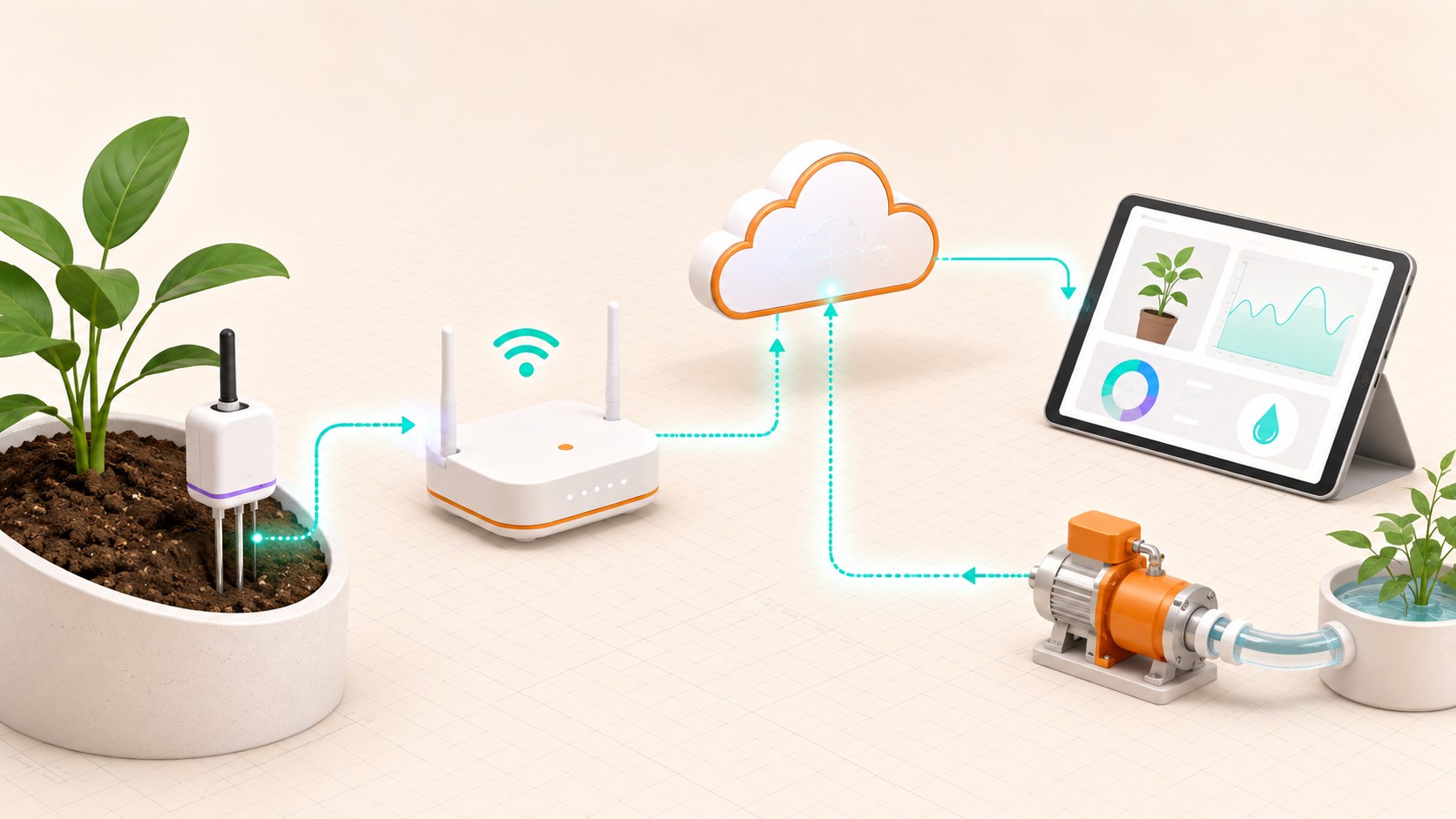
Three-dimensional Internet of Things system linking a plant sensor, gateway, cloud dashboard and water pump
Concept overview · generated for this Academy4Tech lesson
Start here

See the system, then build it.

A useful connected device should still behave safely when Wi-Fi disappears or a message arrives late.

01Trace data from a sensor to a user and back to an actuator
02Choose between local and cloud decisions
03Explain MQTT publish and subscribe
04Identify basic privacy, security and reliability needs
Your progress Keep your learning momentum going

0 of 4 sessions complete

Interactive 3D learning studio

Connected-device studio

Follow a reading from a physical sensor through a gateway to an application and back to an actuator.

Interactive system model · loads on request Poster mode
Explore the system in 3D Inspect the labelled subsystems and watch their modelled process. The lesson flow beside it is a separate conceptual sequence unless it explicitly names the same subsystem. The poster remains available if WebGL is unsupported.
Selected lesson · conceptual flow

The connected device

What belongs inside an IoT system?

Step 1 of 4 · Physical world

Step through this lesson’s conceptual sequence here. Inspect the separate 3D subsystem model below it to understand the system’s structure.

3D subsystem inspector · 4 model parts
Mini experiment

Change one variable. Predict first, then test.

Choose an interval from 5 to 20 seconds.

10 s
Live result Move the control to test your prediction

Choose an interval from 5 to 20 seconds.

Every highlighted 3D group corresponds to a labelled system part. A slider changes the model only when that relationship can be represented faithfully; otherwise the geometry stays still and the live calculation explains the effect. The model simplifies scale and geometry, so use the lesson’s safety notes, measurements and official documentation when building a real system.

01
Session 1 · 20 min

The connected device

What belongs inside an IoT system?

Understand it

An IoT device interacts with the physical world through at least one sensor or actuator and connects to the digital world through a network interface. A complete product may also include a gateway, server, database and user interface.

Interactive concept flow

Step 1 of 4 Physical world

Choose a step to inspect it, or run the complete sequence.

Sequence progress
1 / 4
Picture it

A useful analogy

A school messenger gathers information in one room, follows a route, delivers it, and may bring an instruction back.

Apply it

Worked example

A soil-moisture probe, ESP32 and Wi-Fi connection form the device side of a plant-monitoring system.

Try it
  1. Find three connected products around you.
  2. For each, name one sensor or actuator and one network.
  3. Decide what should happen if the network fails.
Quick checkDoes a cloud dashboard alone make an IoT device?

Answer: No. The system also needs a device that interacts with the physical world and communicates through a network.

02
Session 2 · 25 min

Messages and data journeys

How does a tiny device share useful data?

Understand it

Devices package readings into messages. MQTT commonly uses publish and subscribe: a device publishes to a named topic, and interested clients subscribe. A timestamp and unit make readings meaningful, while a sensible reporting rate avoids wasting bandwidth and power.

Interactive concept flow

Step 1 of 4 Measure

Choose a step to inspect it, or run the complete sequence.

Sequence progress
1 / 4
Picture it

A useful analogy

A radio station broadcasts on a channel; listeners receive only the channels they choose.

Apply it

Worked example

A sensor publishes 31.4 with a timestamp to a temperature topic. A dashboard and an alert service can both subscribe.

Try it
  1. Invent a topic name for classroom temperature.
  2. Write a sample message with value, unit and time.
  3. Choose how often it should be sent and explain why.
Quick checkWhy include a unit with a sensor value?

Answer: Without a unit, a number such as 31.4 could mean degrees Celsius, volts or something else.

03
Session 3 · 25 min

Local and cloud decisions

Where should an IoT decision happen?

Understand it

Local or edge decisions are fast and can work offline. Cloud decisions can combine history and many devices but depend on connectivity. Good systems keep urgent safety rules local and use the cloud for storage, analysis and remote access.

Interactive concept flow

Step 1 of 4 Reading

Choose a step to inspect it, or run the complete sequence.

Sequence progress
1 / 4
Picture it

A useful analogy

You brake a bicycle yourself immediately; you do not phone someone far away and wait for permission.

Apply it

Worked example

A greenhouse controller stops a pump locally when the tank is empty, while the cloud stores daily moisture trends.

Try it
  1. Classify four decisions as local or cloud: stop motor, make weekly chart, send alert, unlock emergency exit.
  2. Explain each choice.
  3. Add a safe fallback.
Quick checkWhich decisions should usually remain local?

Answer: Time-critical or safety-related decisions that must still work during network failure.

04
Session 4 · 30 min

Secure and reliable by design

How do we keep connected devices trustworthy?

Understand it

Security begins with unique device identity, controlled access, protected data, safe updates and clear support. Reliability also needs timeouts, validation and useful behaviour when messages are missing or unreasonable.

Interactive concept flow

Step 1 of 4 Identify

Choose a step to inspect it, or run the complete sequence.

Sequence progress
1 / 4
Picture it

A useful analogy

A building needs named keys, locked doors, visitor rules, maintenance and an emergency plan.

Apply it

Worked example

Reject an impossible humidity reading, encrypt data in transit, change default passwords and stop watering after a maximum safe time.

Try it
  1. Threat-model a connected door sensor.
  2. List what data it reveals and who should access it.
  3. Add one software update and one offline-recovery rule.
Quick checkWhy are default shared passwords dangerous?

Answer: Anyone who knows the common password may gain access to every device that was not changed.

Beyond the guided sessions

Explore the whole Internet of Things field

The guided sessions teach the foundations. This map widens the view across 8 important tracks, with explanations, practice prompts, knowledge checks, and official sources for deeper study.

Connect sensors, devices, networks, and cloud services while protecting data, energy, people, and long-term reliability.

Field map 0 of 8 tracks explored
Open a track to add it to your journey.
  1. Foundation IoT system foundations
    Track overview

    An IoT system links physical measurements and actions to local or remote software under tight resource and connectivity limits.

    Core concepts

    Four ideas to understand

    1. sensor-edge-cloud model

      Sensors capture physical conditions, edge devices process nearby data, and cloud services can store or coordinate information at scale. Work should happen at the layer that best fits latency, privacy, energy, and reliability needs.

    2. telemetry

      Telemetry is time-stamped data a device reports about its environment, operation, or health. Useful messages include units, device identity, quality, and enough context to interpret the value.

    3. remote actuation

      Remote actuation turns a network command into a physical change. Commands need authorization, valid ranges, confirmation, timeouts, and a safe local behavior when the network fails.

    4. device constraints

      Many IoT nodes have limited memory, processing, energy, and network capacity. These limits shape sampling, protocols, storage, security mechanisms, and update design.

    Check your thinking Why might an IoT device process data at the edge instead of sending every sample to the cloud?
    Answer

    Edge processing can reduce latency, bandwidth, energy use, privacy exposure, and dependence on connectivity.

  2. Foundation Sensors and interfaces
    Track overview

    Reliable measurements require the correct electrical interface, sampling method, metadata, and calibration for each sensor.

    Core concepts

    Four ideas to understand

    1. digital inputs

      A digital input interprets voltage as one of two logic states. Pull-up or pull-down resistors prevent a disconnected input from floating unpredictably.

    2. analog sampling

      An analog-to-digital converter measures voltage at discrete times and maps it to a finite number of levels. Input range, resolution, sampling rate, and noise limit what can be observed.

    3. I2C and SPI buses

      I2C addresses several devices on shared clock and data wires, while SPI commonly uses separate select lines and full-duplex clocked data. Voltage levels, bus length, wiring, and device addresses or modes must agree.

    4. signal calibration

      Calibration compares readings with a trusted reference to estimate offset, scale, and sometimes nonlinear error. Store the method, units, date, and conditions so future data stays meaningful.

    Check your thinking What problem does a pull-up resistor solve on a switch input?
    Answer

    It gives the input a defined default logic level when the switch is open.

  3. Applied Networks and protocols
    Track overview

    IoT communication stacks combine a physical network, addressing, and an application protocol chosen for range, power, traffic, and delivery needs.

    Core concepts

    Four ideas to understand

    1. connectivity families

      Wi-Fi offers local IP connectivity and higher throughput, Bluetooth LE favors nearby low-power links, Thread provides low-power IPv6 mesh, and LPWAN or low-power cellular profiles trade data rate for wider coverage. Matter defines an interoperable application layer over IP rather than a new radio.

    2. IP addressing

      An IP address identifies a network interface so packets can be routed, while DNS maps names to addresses. Private addressing, gateways, and changing leases matter when devices must be discovered or reached.

    3. MQTT messaging

      MQTT clients publish messages to named topics through a broker, and subscribers receive matching topics. Quality-of-service levels manage delivery attempts but do not replace application checks for duplicates or stale commands.

    4. HTTP and CoAP APIs

      HTTP serves conventional web APIs, while CoAP provides compact resource requests, discovery, and optional reliability for constrained networks. Protected transport, authentication, authorization, and input validation are still separate design decisions.

    Check your thinking What role does an MQTT broker play?
    Answer

    It receives publications and routes them to clients subscribed to matching topics.

  4. Applied Device firmware
    Track overview

    Good firmware responds to events, manages scarce power and memory, and can be updated without leaving the device unsafe or unusable.

    Core concepts

    Four ideas to understand

    1. event-driven design

      Event-driven firmware reacts to inputs, messages, and timers instead of waiting in long blocking operations. Short handlers keep sensing, communication, and safety responses timely.

    2. timers and interrupts

      Timers schedule precise work, while interrupts signal urgent hardware events. Interrupt handlers should be brief and pass work to normal code to avoid timing faults.

    3. power saving

      Sleep modes, lower radio duty cycle, batched transmissions, and reduced sampling can extend battery life. Measure energy across active, idle, transmit, and sleep states rather than relying on a single current value.

    4. secure updates

      An update process should authenticate the source, verify integrity, protect the transfer, and recover from interruption. Supported update periods and end-of-support behavior are part of the product design.

    Check your thinking Why should an interrupt handler usually be short?
    Answer

    A long handler delays other interrupts and time-sensitive work, making the system less predictable.

  5. Applied Data and cloud services
    Track overview

    IoT services turn streams of observations into histories, alerts, views, and synchronized models of device state.

    Core concepts

    Four ideas to understand

    1. time-series data

      Time-series records pair values with timestamps and often device, unit, and quality metadata. Retention, downsampling, and clock correction keep long histories useful and affordable.

    2. stream processing

      A stream pipeline validates, transforms, joins, or aggregates events as they arrive. Event time and late or duplicate data must be handled explicitly.

    3. dashboards and alerts

      Dashboards reveal current state and trends, while alerts call attention to actionable exceptions. Thresholds, hysteresis, severity, ownership, and rate limits reduce noisy alarms.

    4. device twins

      A digital representation can hold reported state, desired state, metadata, and relationships for a physical device. Timestamps and version rules prevent old updates from overwriting newer truth.

    Check your thinking Why should every time-series reading carry a timestamp and unit?
    Answer

    The timestamp places it in sequence and the unit makes its magnitude interpretable.

  6. Advanced Security and privacy
    Track overview

    IoT security protects devices, services, communications, and personal data throughout setup, operation, updates, transfer, and retirement.

    Core concepts

    Four ideas to understand

    1. device identity

      Each device needs a trustworthy identity and credentials that are not shared as a universal default. Provisioning, rotation, revocation, and ownership transfer must be planned.

    2. encrypted communication

      Modern authenticated encryption protects message confidentiality and detects tampering in transit. Certificate or key validation matters because encryption to an impostor is not secure.

    3. least privilege

      A device, user, or service should receive only the permissions and network access needed for its task. Segmentation and narrow topic or API permissions reduce damage after compromise.

    4. data minimization

      Collect, transmit, retain, and expose only data needed for a stated purpose. Give people understandable choices and a practical way to delete personal data when appropriate.

    Check your thinking Why are unique device credentials safer than one factory password shared by every unit?
    Answer

    Compromise of one unique credential does not automatically unlock the entire product fleet.

  7. Advanced Fleet reliability
    Track overview

    A fleet stays useful when operators can observe health, tolerate outages, recover safely, and control software versions across many devices.

    Core concepts

    Four ideas to understand

    1. health monitoring

      Devices should report meaningful health signals such as uptime, resets, battery, storage, temperature, connectivity, and software version. Heartbeats need a timeout so silence becomes visible.

    2. offline buffering

      A device can queue important events during an outage and upload them after reconnection. Bounded storage, sequence identifiers, expiry, and duplicate handling prevent backlog from becoming a new failure.

    3. fault recovery

      Watchdogs, retry limits, safe states, and rollback help the device recover without endless loops or dangerous commands. Recovery should be tested under loss of power, sensor, network, and service.

    4. version management

      A fleet inventory links hardware revision, firmware, configuration, and support status to each device. Staged rollout and rollback limit the impact of a defective release.

    Check your thinking What is the purpose of a staged firmware rollout?
    Answer

    It exposes a small part of the fleet first so faults can be detected before affecting every device.

  8. Advanced Responsible IoT
    Track overview

    Responsible IoT balances usefulness with interoperability, energy, accessibility, maintainability, and the full product life cycle.

    Core concepts

    Four ideas to understand

    1. edge intelligence

      A local model can reduce delay and raw-data sharing, but it still needs known limits, version control, monitoring, and a fallback. Resource use and model error must fit the device risk.

    2. energy-aware design

      Energy impact includes device operation, radio use, cloud processing, batteries, and replacements. Measure the full workload and avoid sampling or retaining data that adds no value.

    3. interoperability

      Shared data models and documented interfaces let devices and services work across vendors and protocols. W3C WoT describes interoperable device metadata, while Matter defines common application behavior for compatible IP-based products.

    4. product life cycle

      Design covers manufacturing, onboarding, maintenance, software inventory, vulnerability disclosure, updates, ownership transfer, and secure disposal. Users should know the support period and how to erase data at end of life.

    Check your thinking What makes two devices semantically interoperable?
    Answer

    They share the meaning of exchanged data and capabilities, not merely a compatible transport format.

Verified next steps

Official references

Use these primary sources to extend the explanations and check current guidance.

  1. Internet Engineering Task Force RFC 7228: Terminology for Constrained-Node Networks
  2. World Wide Web Consortium Web of Things (WoT) Architecture 1.1
  3. OASIS Open MQTT Version 5.0
  4. Internet Engineering Task Force RFC 7252: The Constrained Application Protocol (CoAP)
  5. Connectivity Standards Alliance Build with Matter
  6. Arduino Analog Input Pins
  7. Arduino Inter-Integrated Circuit (I2C) Protocol
  8. Arduino Arduino and Serial Peripheral Interface (SPI)
  9. Arduino The Arduino Guide to Low Power Design
  10. National Institute of Standards and Technology Foundational Cybersecurity Activities for IoT Product Manufacturers
  11. National Institute of Standards and Technology IoT Device Cybersecurity Capability Core Baseline
  12. European Telecommunications Standards Institute ETSI EN 303 645 V3.1.3 — Cyber Security for Consumer Internet of Things: Baseline Requirements
Three-project build pathway

Learn Internet of Things by making it work.

Start small, combine the ideas, then complete a measured challenge. Every project includes a material list, four build milestones, evidence to collect, and a safe next step.

  1. Starter · 60–90 minutes Local Comfort-Signal Monitor Learn one dependable building block Model a room-comfort sensor that publishes synthetic temperature readings to a local dashboard and changes a virtual indicator when a clearly documented threshold is crossed.
    What you will learn

    Learning goals

    • Trace data from sensor sampling through a message to an application view.
    • Choose a useful sampling and publishing interval rather than sending continuously.
    • Separate a measured value, its unit, timestamp, device identity, and quality status.
    Prepare

    Materials and tools

    • Browser-based IoT or MQTT simulator
    • Synthetic temperature dataset supplied by the learner or teacher
    • Local dashboard or message-inspection tool
    • Data-flow worksheet
    Build sequence

    Four milestones

    1. Draw the device, broker or gateway, dashboard, and virtual actuator with labelled message directions.

    2. Define a compact message containing pseudonymous device ID, timestamp, value, unit, and validity flag.

    3. Publish the synthetic series at three intervals and observe latency, message count, and dashboard behavior.

    4. Choose an interval and threshold, then add visible stale-data and invalid-reading states.

    Prove it works

    Evidence to collect

    • Every displayed reading preserves its unit, timestamp, and validity information.
    • The dashboard distinguishes normal, threshold, invalid, and stale conditions using the supplied test data.
    • The learner justifies the selected interval with both responsiveness and message-cost evidence.
  2. Builder · 2–3 hours Resilient Plant-Care Demo Connect multiple ideas into a working system Build a local digital plant-care system using synthetic or safely collected moisture readings, retained status, command acknowledgement, and a simulated pump so learners can inspect normal and disconnected behavior.
    What you will learn

    Learning goals

    • Design separate telemetry, command, acknowledgement, and availability messages.
    • Explain delivery quality, retained state, freshness, and reconnection behavior.
    • Apply least-data and least-privilege choices to a connected-device design.
    Prepare

    Materials and tools

    • Local MQTT broker or browser simulation
    • Synthetic soil-moisture time series or teacher-approved low-voltage sensor
    • Virtual pump indicator; no water pump is required
    • Dashboard, topic map, and failure-test checklist
    Build sequence

    Four milestones

    1. Define topic names, message schemas, units, freshness rules, and which client may publish or subscribe.

    2. Build telemetry and dashboard paths, then add a virtual pump command with a unique command ID and acknowledgement.

    3. Test duplicate messages, out-of-order timestamps, broker disconnection, reconnection, and stale retained data.

    4. Add an offline-safe state and audit trail, then document which failures remain visible to the user.

    Prove it works

    Evidence to collect

    • The dashboard never presents stale or invalid data as a current trustworthy measurement.
    • Repeated command IDs do not cause repeated simulated watering, and every accepted command has a matching acknowledgement.
    • A five-scenario failure table records expected result, actual result, and the implemented recovery.
  3. Challenge · 4–6 hours Secure Classroom Device-Fleet Twin Test, measure, and improve a complete solution Create a simulation of several connected classroom devices with inventory, per-device identity, health reporting, configuration versions, staged updates, and retirement. The project treats lifecycle security as part of the product rather than an add-on.
    What you will learn

    Learning goals

    • Model device identity, configuration, software version, health, and lifecycle state.
    • Plan provisioning, monitoring, update, rollback, credential rotation, and decommissioning.
    • Evaluate the system under compromised, outdated, duplicated, and unreachable-device scenarios.
    Prepare

    Materials and tools

    • Local IoT fleet simulator or scripts representing at least five virtual devices
    • Local authenticated broker or simulated message bus
    • Inventory dashboard and structured event log
    • Threat-model and test-matrix templates
    Build sequence

    Four milestones

    1. Create an inventory schema with pseudonymous identity, owner role, version, configuration, health, and lifecycle state.

    2. Implement enrolment and periodic health messages with per-device authorization and replay-resistant event identifiers.

    3. Simulate staged update, verification, failure, rollback, credential rotation, quarantine, and retirement workflows.

    4. Run a threat-informed test matrix, minimize collected data, and produce an operator response guide.

    Prove it works

    Evidence to collect

    • The inventory can identify every outdated, unreachable, quarantined, and retired simulated device without collecting personal information.
    • A failed staged update stops rollout and produces a visible, auditable rollback or quarantine result.
    • The report maps each major risk to a prevention, detection, recovery, and lifecycle control plus a stated residual limitation.
Words to know

Build your vocabulary.

Transducer
A sensor or actuator that connects computing to the physical world.
Gateway
A device that connects local devices to another network.
MQTT
A lightweight publish-and-subscribe messaging protocol.
Topic
A named MQTT channel used to organize messages.
Edge
Computing performed close to the device or data source.
Fallback
A safe alternative behaviour when the normal service fails.
Work safely

Before you power or move anything.

  • Never connect classroom prototypes directly to mains voltage.
  • Collect only the data the project needs.
  • Use test credentials and never publish passwords or private keys.
Keep studying

Official documentation.

These lessons simplify the first ideas. Use the original documentation when building, checking details or moving to the next level.

Continue learning

Related Academy4Tech content.

Learn by building.

Choose a real project, identify the smallest subsystem you can test, and document what the measurement tells you.