
Intermediate · visual course

Computer Vision

Computer vision converts sampled light into numbers, then uses geometry and learned patterns to extract useful information.

OpenCVPythonCameras 4 guided sessions 8 skill tracks 3 example projects
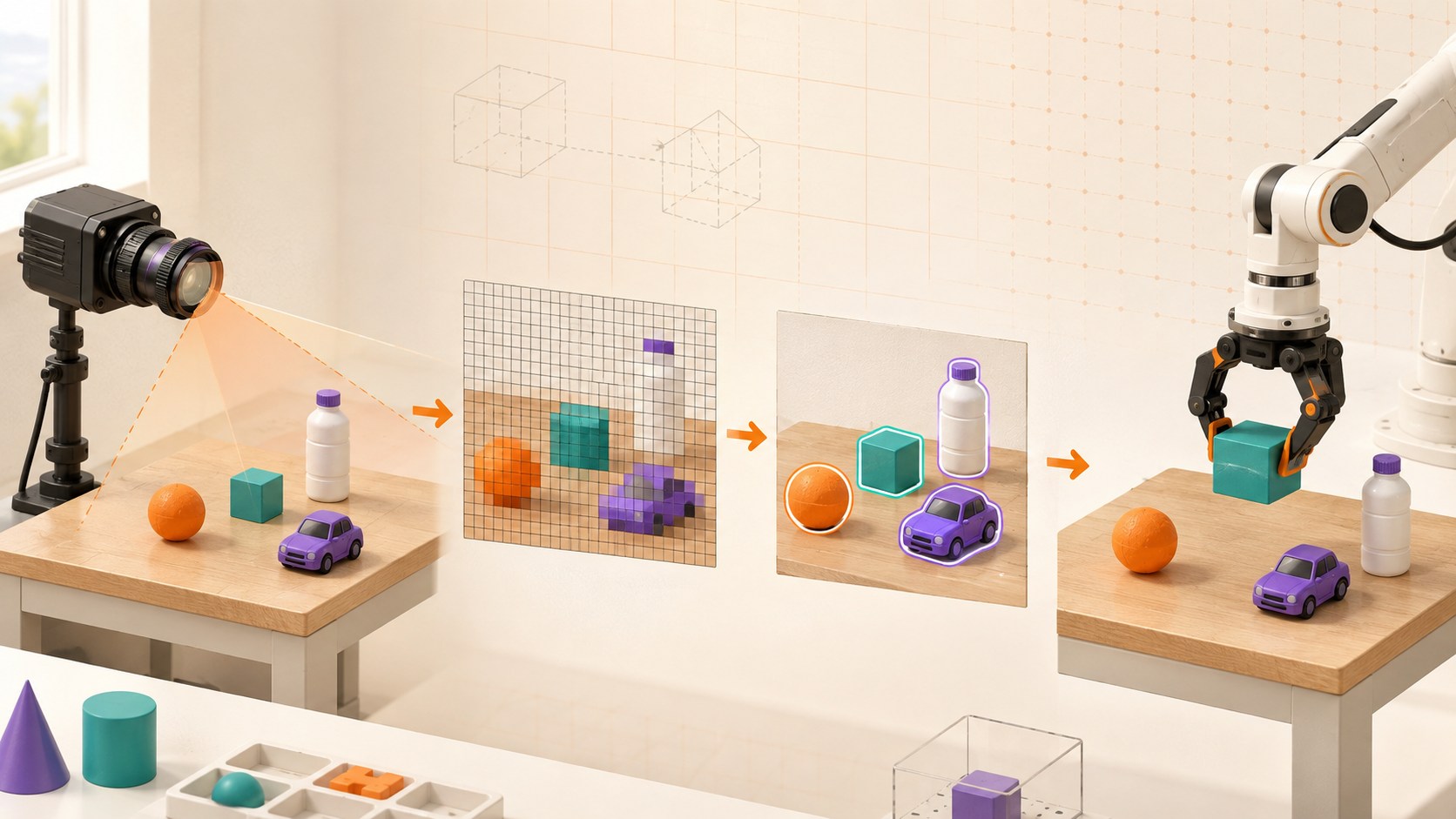
Three-dimensional computer vision pipeline from camera and pixels to detected objects and robot action
Concept overview · generated for this Academy4Tech lesson
Start here

See the system, then build it.

A camera captures pixels, not meaning. Lighting, viewpoint and calibration affect every later decision.

01Describe an image as a grid of channel values
02Explain a basic vision pipeline
03Distinguish detection, segmentation and tracking
04Connect visual measurements to a safe action
Your progress Keep your learning momentum going

0 of 4 sessions complete

Interactive 3D learning studio

Camera perception studio

See light become pixels, structure and a measured detection that can guide an action.

Interactive system model · loads on request Poster mode
Explore the system in 3D Inspect the labelled subsystems and watch their modelled process. The lesson flow beside it is a separate conceptual sequence unless it explicitly names the same subsystem. The poster remains available if WebGL is unsupported.
Selected lesson · conceptual flow

From light to pixels

What does a camera give the computer?

Step 1 of 4 · Scene light

Step through this lesson’s conceptual sequence here. Inspect the separate 3D subsystem model below it to understand the system’s structure.

3D subsystem inspector · 4 model parts
Mini experiment

Change one variable. Predict first, then test.

Find a clear exposure from 8 to 16 ms.

12 ms
Live result Move the control to test your prediction

Find a clear exposure from 8 to 16 ms.

Every highlighted 3D group corresponds to a labelled system part. A slider changes the model only when that relationship can be represented faithfully; otherwise the geometry stays still and the live calculation explains the effect. The model simplifies scale and geometry, so use the lesson’s safety notes, measurements and official documentation when building a real system.

01
Session 1 · 20 min

From light to pixels

What does a camera give the computer?

Understand it

A lens focuses light onto a sensor. The sensor samples the scene into a grid of pixels. Each pixel stores intensity or colour-channel values. Resolution controls spatial detail, while exposure affects brightness and blur.

Interactive concept flow

Step 1 of 4 Scene light

Choose a step to inspect it, or run the complete sequence.

Sequence progress
1 / 4
Picture it

A useful analogy

A mosaic represents a scene using many small coloured tiles; step back and the picture appears.

Apply it

Worked example

A 640 × 480 image contains 307,200 pixel positions, each with one or more channel values.

Try it
  1. Draw an 8 × 8 pixel icon on squared paper.
  2. Encode dark and light squares as 0 and 1.
  3. Explain what detail is lost at low resolution.
Quick checkDoes one pixel know which object it belongs to?

Answer: No. A pixel only stores measured values; algorithms infer structure from patterns across pixels.

02
Session 2 · 25 min

Improve and find structure

How can useful shapes emerge from noisy pixels?

Understand it

Preprocessing can resize, change colour space, smooth noise or improve contrast. Gradients describe rapid intensity change and often reveal edges. Thresholding separates ranges, while morphology can remove small gaps or specks.

Interactive concept flow

Step 1 of 4 Raw image

Choose a step to inspect it, or run the complete sequence.

Sequence progress
1 / 4
Picture it

A useful analogy

Cleaning a foggy window and tracing strong boundaries makes the important shapes easier to see.

Apply it

Worked example

Convert a high-contrast part to grayscale, blur small noise, then find edges before measuring its outline.

Try it
  1. Photograph one object on two backgrounds.
  2. Predict which background gives a cleaner threshold.
  3. List one lighting change that could break the method.
Quick checkWhy blur before some edge detectors?

Answer: Smoothing can reduce small noise that would otherwise create false edges.

03
Session 3 · 25 min

Detect, segment and track

What kind of answer should a vision system produce?

Understand it

Classification names an entire image. Detection locates objects with boxes or positions. Segmentation labels individual pixels. Tracking follows an object over time. Choose the least complex output that solves the task.

Interactive concept flow

Step 1 of 4 Image

Choose a step to inspect it, or run the complete sequence.

Sequence progress
1 / 4
Picture it

A useful analogy

“There is a ball” is classification; pointing to it is detection; colouring every ball pixel is segmentation; following it is tracking.

Apply it

Worked example

A sorting robot may need a contour centre and orientation, not a large general-purpose recognition model.

Try it
  1. Choose outputs for three tasks: photo album, robot pick-up, football analysis.
  2. Explain the minimum needed.
  3. Draw the expected output on one sample image.
Quick checkWhich task assigns a class to each relevant pixel?

Answer: Segmentation.

04
Session 4 · 30 min

Vision-guided action

How does a pixel position become a physical movement?

Understand it

Calibration relates image measurements to camera geometry. A robot also needs coordinate transforms between camera, robot and world frames. Confidence checks, reach limits and a safe stop keep uncertain visual results from causing unsafe motion.

Interactive concept flow

Step 1 of 4 Pixel measurement

Choose a step to inspect it, or run the complete sequence.

Sequence progress
1 / 4
Picture it

A useful analogy

A map location is useful only when you know the map scale, orientation and your own position.

Apply it

Worked example

Find an object centre in pixels, convert it to a table coordinate using calibration, confirm it lies in the safe workspace, then command the gripper.

Try it
  1. Place a grid beside an object in a photo.
  2. Estimate scale in pixels per centimetre.
  3. List two reasons the estimate changes when the camera moves.
Quick checkWhy is camera calibration important?

Answer: It connects image measurements to camera geometry so positions and sizes can be interpreted accurately.

Beyond the guided sessions

Explore the whole Computer Vision field

The guided sessions teach the foundations. This map widens the view across 8 important tracks, with explanations, practice prompts, knowledge checks, and official sources for deeper study.

Study the principles, assumptions, geometry, learned models, evaluation, ethics, and failure modes behind vision systems before choosing a particular software API.

Field map 0 of 8 tracks explored
Open a track to add it to your journey.
  1. Foundation Images and cameras
    Track overview

    A digital image is a sampled measurement shaped by scene light, optics, exposure, sensor response, and numeric representation.

    Core concepts

    Four ideas to understand

    1. pixels and channels

      A pixel stores one or more channel values at a grid location, such as intensity or color components. Channel order, data type, and numeric range must be known before arithmetic or display.

    2. resolution and dynamic range

      Spatial resolution limits visible detail, while dynamic range limits how bright and dark a scene can be represented together. More pixels do not compensate for blur, noise, or clipped highlights.

    3. lenses and exposure

      Focal length and sensor size shape field of view, while focus affects sharpness. Aperture, shutter time, and gain balance brightness against depth of field, motion blur, and noise.

    4. sampling and aliasing

      Sampling turns continuous space and time into pixels and frames. Detail or motion above the sampling limit can appear as false patterns, so optical filtering and suitable frame rate matter.

    Check your thinking What causes motion blur when a subject moves during capture?
    Answer

    The sensor integrates light while the image moves across it during the exposure time.

  2. Foundation Image processing
    Track overview

    Image-processing operations transform color, local neighborhoods, and binary regions to reveal structure or prepare data for later algorithms.

    Core concepts

    Four ideas to understand

    1. color spaces

      RGB describes additive color channels, while spaces such as HSV or Lab separate color properties differently. Conversion must use the correct channel order and range; no color space eliminates lighting effects.

    2. convolution and filtering

      A convolution-like filter computes each output from a local kernel around the pixel. Smoothing reduces noise but softens detail, while derivative filters emphasize changes and also amplify noise.

    3. thresholding

      Thresholding separates values into classes using a global, adaptive, or automatically selected boundary. Illumination variation and overlapping intensity distributions can make one threshold unreliable.

    4. morphology

      Erosion and dilation reshape binary or grayscale regions with a structuring element. Opening removes small foreground marks; closing fills small gaps, with results determined by kernel shape and scale.

    Check your thinking What two operations form a morphological opening?
    Answer

    Erosion followed by dilation using the chosen structuring element.

  3. Applied Features and geometry
    Track overview

    Features identify repeatable image structure, while camera geometry relates 2D measurements to rays, planes, motion, and 3D space.

    Core concepts

    Four ideas to understand

    1. edges and corners

      Edges mark strong intensity change, while corners vary in more than one direction and are easier to localize. Detection scales and thresholds control the trade between missed structure and noise.

    2. descriptors and matching

      A descriptor summarizes the neighborhood around a keypoint so likely correspondences can be found. Ratio, cross-check, and geometric tests reject ambiguous or inconsistent matches.

    3. camera calibration

      Calibration estimates intrinsic parameters and lens distortion from known geometry across varied views. Reprojection error helps diagnose fit, but independent images are needed to validate it.

    4. perspective geometry

      Projective geometry explains how 3D points map into an image. A homography maps one plane between views, while epipolar constraints relate two cameras for general 3D scenes.

    Check your thinking When can one homography describe the mapping between two images?
    Answer

    For points on one plane, or for a camera rotating about its optical center under the projective model.

  4. Applied Objects and regions
    Track overview

    Vision systems can describe connected shapes, label every pixel, place boxes around instances, or estimate landmarks and pose.

    Core concepts

    Four ideas to understand

    1. contours and components

      Connected-component labeling groups neighboring foreground pixels, while contours trace region boundaries. Area, perimeter, centroid, holes, and shape measures support filtering and measurement.

    2. segmentation

      Semantic segmentation assigns a class to each pixel, while instance segmentation separates individual objects. Boundary quality, small objects, ambiguous labels, and class imbalance need dedicated evaluation.

    3. object detection

      Detection predicts classes and regions, commonly as bounding boxes with confidence scores. Non-maximum suppression retains selected high-scoring boxes and suppresses sufficiently overlapping alternatives; score thresholds trade false alarms against misses.

    4. pose estimation

      Pose may mean body landmarks or a rigid object position and orientation. Occlusion, symmetry, calibration, and multiple plausible interpretations create uncertainty that downstream actions must respect.

    Check your thinking How does instance segmentation differ from semantic segmentation?
    Answer

    Instance segmentation separates different objects of the same class; semantic segmentation gives those pixels the same class label.

  5. Applied Motion and 3D
    Track overview

    Multiple frames or viewpoints reveal apparent motion, object identity, depth, camera movement, and 3D structure.

    Core concepts

    Four ideas to understand

    1. optical flow

      Optical flow estimates apparent pixel movement between frames under assumptions such as brightness consistency and small motion. Occlusion, low texture, illumination change, and large displacement cause failure.

    2. multi-object tracking

      Tracking predicts object state and associates detections over time to maintain identities. Crossings, missed detections, appearance change, and long occlusion can cause identity switches.

    3. stereo depth

      Calibrated cameras view the same point at different horizontal positions after rectification. Disparity is inversely related to depth, so distant or textureless areas have greater uncertainty.

    4. structure from motion

      Structure from motion jointly estimates camera poses and sparse 3D points from matched features across views. Bundle adjustment refines them by reducing reprojection error.

    Check your thinking For a fixed stereo baseline and focal length, what happens to disparity as depth increases?
    Answer

    Disparity becomes smaller because, for a fixed baseline and focal length, disparity is inversely related to depth.

  6. Advanced Deep vision
    Track overview

    Modern vision learns reusable image and multimodal representations, then adapts them through labels, prompts, or task-specific fine-tuning under controlled evaluation.

    Core concepts

    Four ideas to understand

    1. convolutional networks

      CNNs reuse local filters across an image to build hierarchical features. Label-preserving augmentation can improve robustness, but stride, pooling, or unsuitable transformations can discard task-relevant detail.

    2. vision transformers and pretraining

      Vision transformers represent image patches as tokens and use attention to connect distant regions. Large supervised or self-supervised pretraining can create reusable foundation representations, but performance still depends on data, compute, and deployment conditions.

    3. open-vocabulary and promptable vision

      Image-text models can recognize categories described at evaluation time, while promptable segmenters can use points, boxes, or text-like guidance. These interfaces expand reuse but do not guarantee correct labels, boundaries, or behavior outside training coverage.

    4. vision-language transfer

      Vision-language models connect visual inputs with text for retrieval, description, or question answering. When adapting a pretrained model, check domain mismatch, preprocessing, prompt sensitivity, license, rapid overfitting, and whether language fluency hides visual errors.

    Check your thinking Why does a promptable or open-vocabulary model still need task-specific evaluation?
    Answer

    Flexible prompts do not remove training-data limits, ambiguity, calibration errors, or deployment-specific failure modes.

  7. Advanced Evaluation and ethics
    Track overview

    A vision metric is meaningful only when paired with representative test conditions, subgroup analysis, calibrated uncertainty, privacy protection, and human impact review.

    Core concepts

    Four ideas to understand

    1. IoU and task metrics

      Intersection over Union measures overlap between predicted and reference regions and supports detection or segmentation metrics. Report thresholds, class behavior, latency, and error examples because one aggregate score hides failure types.

    2. confidence calibration

      A calibrated model is correct about as often as its stated confidence across comparable cases. Reliability plots and proper scoring rules reveal overconfidence that accuracy alone misses.

    3. distribution shift

      Changes in camera, weather, location, population, or workflow can move deployment data away from the test set. Test named shifts and monitor inputs and outcomes after release.

    4. privacy and demographic effects

      Images can reveal identity, location, health, and bystanders, so minimize capture, access, retention, and secondary use. For people-facing systems, evaluate errors across relevant demographic and environmental groups and provide recourse.

    Check your thinking Why is one overall accuracy value insufficient for a people-facing vision system?
    Answer

    It can hide important error types, operating-condition failures, and unequal performance across affected groups.

  8. Advanced Real-time deployment
    Track overview

    Real-time vision is an end-to-end timed system whose capture, preprocessing, inference, decisions, and fallback behavior must all be measured.

    Core concepts

    Four ideas to understand

    1. video pipelines

      A pipeline moves frames through capture, decoding, preprocessing, inference, postprocessing, and output. Queue design and timestamps determine whether it stays current or slowly builds latency.

    2. compression

      Compression reduces bandwidth and storage but can remove texture or add artifacts that change model output. Evaluate the model using the actual codec, bitrate, resolution, and network path.

    3. edge acceleration

      GPUs and specialized accelerators can lower inference time, while quantization or reduced resolution lowers compute. Verify accuracy, supported operators, thermal behavior, and total pipeline latency on target hardware.

    4. monitoring and fallback

      Monitor camera health, frame age, data shift, confidence, latency, and downstream outcomes. When inputs or models are unreliable, the system should abstain, degrade safely, or ask a person rather than silently continue.

    Check your thinking Why can high frames per second still coexist with poor real-time behavior?
    Answer

    A backlog can process many old frames per second while end-to-end latency keeps the displayed decision behind reality.

Verified next steps

Official references

Use these primary sources to extend the explanations and check current guidance.

  1. University of Washington Computer Vision: Algorithms and Applications, 2nd ed.
  2. OpenCV OpenCV Tutorials
  3. PyTorch Foundation Transfer Learning for Computer Vision Tutorial
  4. Google Research An Image is Worth 16×16 Words: Transformers for Image Recognition at Scale
  5. OpenAI Learning Transferable Visual Models From Natural Language Supervision
  6. Meta AI Research Segment Anything
  7. COCO Consortium COCO — Common Objects in Context
  8. National Institute of Standards and Technology Face Recognition Technology Evaluation: Demographic Effects in Face Recognition
  9. National Institute of Standards and Technology AI Risk Management Framework
Three-project build pathway

Learn Computer Vision by making it work.

Start small, combine the ideas, then complete a measured challenge. Every project includes a material list, four build milestones, evidence to collect, and a safe next step.

  1. Starter · 60–90 minutes Pixel and Exposure Detective Learn one dependable building block Photograph learner-owned tabletop objects under controlled lighting and inspect how exposure, resolution, noise, blur, and colour values change the digital evidence available to a vision system.
    What you will learn

    Learning goals

    • Connect scene light, lens, sensor sampling, pixels, and an image array.
    • Distinguish brightness, blur, noise, resolution, and dynamic-range effects.
    • Use controlled comparisons rather than judging image quality from one attractive picture.
    Prepare

    Materials and tools

    • Phone or webcam with manual controls if available, or supplied non-personal images
    • Three learner-owned tabletop objects, printed grayscale steps, and ruler
    • Diffuse desk lighting; no flash is required
    • Image inspector, histogram tool, and observation sheet
    Build sequence

    Four milestones

    1. Frame a privacy-safe still life and write predictions for short, balanced, and long exposure conditions.

    2. Capture or select matched images while changing only one setting at a time and preserve basic metadata.

    3. Inspect pixel values, histograms, clipped regions, edge sharpness, and visible noise in named regions.

    4. Choose settings for a stated measurement task and explain the trade-off with annotated evidence.

    Prove it works

    Evidence to collect

    • At least three matched image pairs isolate exposure, motion, or resolution instead of changing everything together.
    • Annotations correctly identify one clipped, noisy, blurred, and well-resolved region using measured evidence.
    • The recommendation names its task, conditions, trade-off, and a limitation that requires another test.
  2. Builder · 2–3 hours Measured Shape-and-Colour Detector Connect multiple ideas into a working system Build a classical vision pipeline that finds coloured paper shapes, measures their location and size, and exposes every intermediate image so learners can diagnose lighting, segmentation, and geometry failures.
    What you will learn

    Learning goals

    • Connect calibration, colour representation, filtering, segmentation, contours, and measurement.
    • Evaluate detections with labelled examples, false positives, false negatives, and measurement error.
    • Design for changed lighting, scale, overlap, and background rather than one perfect scene.
    Prepare

    Materials and tools

    • Webcam or supplied privacy-safe tabletop image set
    • Matte coloured paper circles, rectangles, and triangles of known dimensions
    • Plain background, ruler, and diffuse desk light
    • Vision notebook or visual pipeline tool with mask and contour displays
    Build sequence

    Four milestones

    1. Create labelled development and test images across lighting, distance, rotation, overlap, and background conditions.

    2. Build a visible pipeline for colour conversion, filtering, thresholding, morphology, contour extraction, and shape measurement.

    3. Tune only on development images, then calculate detection and size error on untouched test images.

    4. Analyse at least five failures, add an invalid-scene or low-confidence result, and document the supported conditions.

    Prove it works

    Evidence to collect

    • The final test report includes image counts, object counts, false positives, false negatives, and size error rather than selected success screenshots.
    • Every output can be traced through original image, processed image, mask, contour, and numeric measurement.
    • The system marks unsupported or ambiguous scenes instead of inventing a precise measurement.
  3. Challenge · 4–6 hours Privacy-Aware Quality Inspection Test, measure, and improve a complete solution Design a vision prototype that checks learner-made paper assemblies for a missing marker or incorrect orientation while minimizing capture, defining an uncertain result, and comparing a classical baseline with a small learned approach.
    What you will learn

    Learning goals

    • Define the imaging envelope, labels, metrics, uncertainty, and decision cost before selecting a model.
    • Compare classical and learned methods on the same held-out scenario groups.
    • Apply consent, data minimization, retention, failure review, and human authority throughout the lifecycle.
    Prepare

    Materials and tools

    • Learner-created paper assemblies with fictional pass and review conditions
    • Fixed overhead camera or supplied non-personal synthetic image set
    • Computer-vision and small-model notebook environment
    • Dataset sheet, risk register, evaluation template, and review interface
    Build sequence

    Four milestones

    1. Define the narrow inspection task, camera boundary, consent notice, retention limit, label guide, uncertain class, and human decision path.

    2. Collect or generate balanced privacy-safe images split by scene, then build an explainable geometric or colour baseline.

    3. Train a small learned comparator without test leakage and evaluate both approaches across lighting, position, occlusion, and new-design groups.

    4. Create a review queue, test out-of-scope scenes and corrupt images, and publish a data sheet, model card, and rollback rule.

    Prove it works

    Evidence to collect

    • Held-out results report scenario counts, per-class precision and recall, uncertain rate, and confidence intervals or clearly stated sampling limits.
    • People, identifying text, screens, and out-of-envelope scenes are excluded or routed to review rather than processed as valid parts.
    • The final comparison selects an approach from accuracy, inspectability, compute, privacy, and failure evidence—not novelty alone.
Words to know

Build your vocabulary.

Pixel
One sampled position in a digital image.
Channel
One component of image data, such as red, green or blue.
Threshold
A rule that separates values into groups.
Detection
Finding and locating objects.
Segmentation
Assigning a label to individual pixels.
Calibration
Estimating camera properties that connect images to geometry.
Keep studying

Official documentation.

These lessons simplify the first ideas. Use the original documentation when building, checking details or moving to the next level.

Continue learning

Related Academy4Tech content.

Learn by building.

Choose a real project, identify the smallest subsystem you can test, and document what the measurement tells you.